Menu
- API
- Report Builder
- VRM 360
Implementing the Global Vehicle Image Service
The Global Vehicle Image Service provides a consistent, two-step approach to identifying vehicles and retrieving high-quality vehicle images worldwide.
Overview
Implementation is split into two stages:
- Vehicle Identification – identify the closest matching vehicle(s) and available images
- Image Retrieval – retrieve a specific image in the required format using an image ID
This separation allows flexibility, cost control, and reuse of identification results across different image requests.
Step 1: Vehicle Identification
The first step identifies the vehicle and returns a list of available image IDs. There are three identification options, all of which return the same response structure:
Identification Options
- Image Search by VRM (UK only – chargeable)
Uses a UK vehicle registration mark (VRM) to identify the vehicle. - Image Search by VIN (Europe – chargeable)
Uses a VIN to identify the vehicle across supported European markets. - Global Image Search (Worldwide – free)
Identifies vehicles using descriptive vehicle attributes (for example manufacturer, model, body type).
Identification Response
All three methods return:
- One or more matching vehicles
- A set of image IDs for each vehicle
- Each image ID represents a named view of the vehicle (e.g. front, rear, side)
In limited cases, multiple vehicles may be returned. This typically occurs when key attributes (such as body style) are missing from the search input. In these scenarios, a choice of possible vehicles is provided for the user to select from.
Step 2: Image Retrieval
Once a vehicle has been identified, images are retrieved using the Image from ID endpoint.
How It Works
- Pass an image ID returned from Step 1
- Include additional parameters to define the required format (e.g. size, background, resolution)
The service returns:
- Pass an image ID returned from Step 1
This link can then be used to download and display the image as required.
Using VRM Lookup Results in the Global Image Search
If you have already performed a VRM Lookup, you can reuse that data to identify vehicles using the Global Image Search at no additional cost.
Example Scenario
- Perform a VRM Lookup (chargeable)
- Take the returned vehicle attributes
- Map them into the Global Image Search request to find matching vehicles and images for free
Field Mapping
Use the following mappings when passing VRM Lookup results into the Global Image Search:
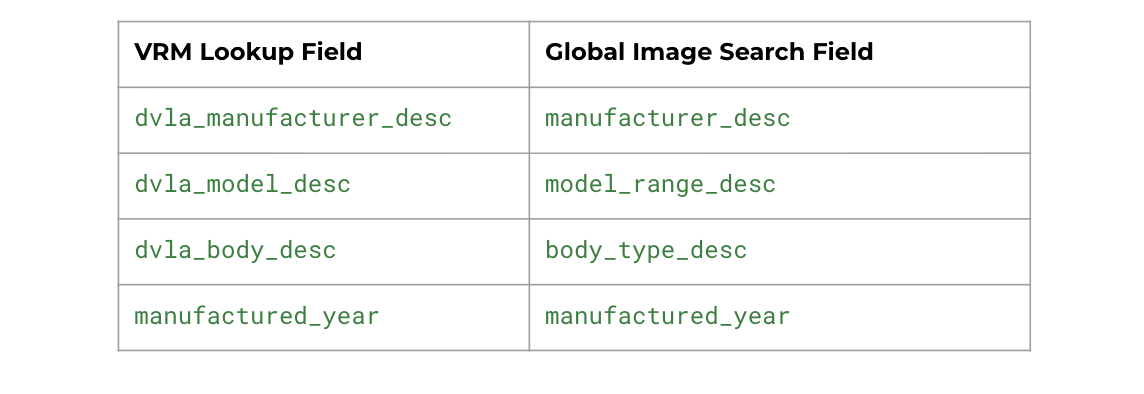
This approach avoids repeated chargeable lookups while still allowing accurate vehicle and image identification.
Mapping from Your Existing Data Provider
The same approach used for VRM Lookups can be applied to any existing vehicle data provider.
Recommended Approach
- Identify the key fields in your data source:
- Manufacturer
- Model or model range
- Body type
- Manufactured year
- Derivative or variant
- Map those fields into the equivalent Global Image Search parameters
- Where possible, provide derivative or variant in the derivative_desc field to increase matching accuracy
By aligning your existing vehicle data with the Global Image Search fields, you can identify matching vehicles and retrieve images without relying on chargeable lookup methods or manual mapping.
Support
If you have questions or need further advice on implementing the Global Vehicle Image Service or mapping your data, please contact:
help@oneautoapi.com
We’re happy to help you optimise your integration.